

Shopify's pricing looks simple on the marketing page, but the sticker price is only part of the story. The real cost of running a store is the monthly plan plus payment processing fees plus your app subscriptions. Understand all three and you can pick a plan with confidence instead of guessing. This guide breaks down exactly what you pay for and where the hidden costs live.
The Three Core Plans, Decoded
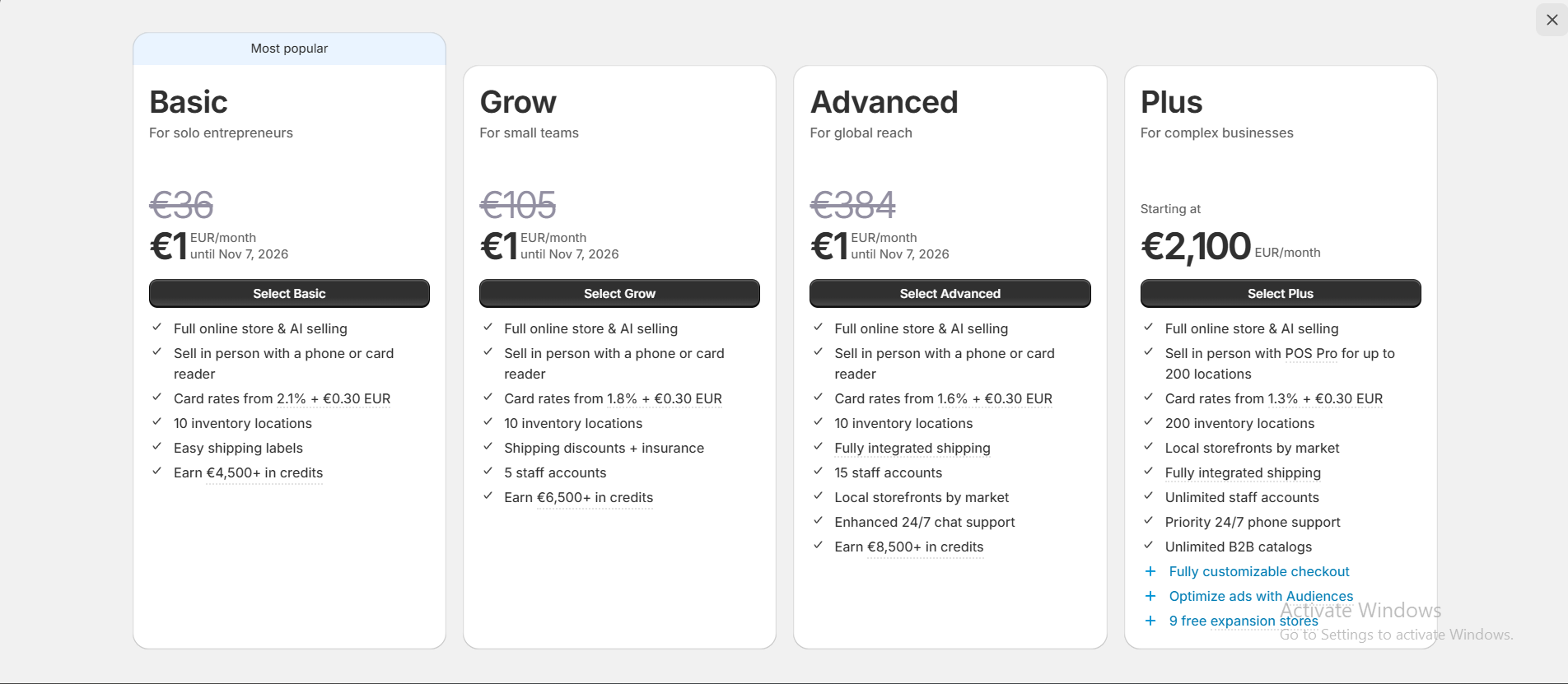
Shopify's main tiers share the same core store builder. What changes between them is the payment processing rate, the depth of reporting, and how many staff accounts you get. In practice the differences matter most as your order volume grows.
- Basic: the right starting point for most new stores. Lower monthly cost, slightly higher card rates, and everything you need to sell.
- Shopify: the middle tier, with better card rates and professional reports that start to pay off once you have steady daily orders.
- Advanced: built for higher volume, with the lowest card rates, advanced report building, and third-party calculated shipping rates.
The Hidden Costs Nobody Mentions
The monthly fee is the number everyone compares, but three quieter costs decide your true monthly spend. The first is the payment processing rate: a percentage plus a small flat fee on every single sale. The second is the extra third-party transaction fee, charged only when you use an external gateway instead of Shopify Payments. The third is your app stack, which quietly adds up.
- Credit card rates: charged on every transaction, and they shrink as you move up plans.
- Third-party gateway fees: an additional percentage per order if you do not use Shopify Payments, which can erase the savings of a cheaper plan.
- App stack costs: a typical store runs several apps at nine to forty dollars each, so an unmanaged stack can cost more than the plan itself.
Calculating Your Real Monthly Cost
To compare plans honestly, do not look at the monthly price alone. Estimate your monthly revenue, apply each plan's card rate to that number, then add the monthly fee and your expected app subscriptions. Only then can you see which plan is genuinely cheaper for your volume. A higher monthly fee often wins once the lower card rate is applied to real sales.
Keep Shopify Payments switched on wherever it is available. It removes the extra third-party transaction fee completely, which is usually the single biggest lever on your effective cost.
Card Rates: The Fee That Scales With You
The payment processing rate is the cost most founders underestimate, because it feels small on a single order yet compounds across every sale you ever make. A difference of a few tenths of a percent looks trivial next to a plan's monthly fee, but applied to thousands of dollars in monthly revenue it quickly becomes the largest line on your bill. This is exactly why higher plans lower the card rate: Shopify is trading a bigger monthly fee for a smaller cut of each transaction.
The practical takeaway is to model your fees against realistic revenue, not against a single sale. Multiply your expected monthly sales by each plan's card rate, then add the monthly fee, and the cheapest option for your actual volume becomes obvious. As your store grows, revisit this calculation every few months, because the plan that was cheapest at launch is rarely the cheapest at scale.
The App Stack Trap
Beyond plans and card rates, your app subscriptions are the cost that silently balloons. It is easy to add a review app, an email tool, an upsell widget, and a loyalty program without noticing that together they can rival or exceed your entire plan fee. Each one feels justified in isolation, yet the total is what shows up on your card each month.
Treat your app stack like a budget, not a wishlist. List every app, its monthly cost, and the specific number it is supposed to move, then cut anything you cannot defend. A lean stack keeps your effective cost of running the store low and your storefront fast, which protects both margin and conversion at the same time.
Which Plan Should You Actually Choose?
If you are just launching, start on the lowest plan that lets you sell and let real order volume pull you upward. Upgrade only when a spreadsheet, not ambition, shows the card-rate savings beat the higher monthly fee. Audit your apps every month and remove anything you cannot tie to revenue or saved time.
Frequently Asked Questions
Can I change plans later?
Yes. You can upgrade or downgrade at any time from your admin, and your store data, products, and orders carry over without interruption.
What are third-party transaction fees?
They are an extra percentage Shopify charges per order when you use an external payment gateway instead of Shopify Payments. Using Shopify Payments removes this fee entirely.
Is the annual plan worth it?
If you are committed for the year, paying annually usually reduces the monthly cost noticeably, so it is worth it once you are past the validation stage.